


全11パターン!よく見るリストマーカーをCSSで作ってみた

 :
:画像を使わないので、サイズやカラー変更もできて便利です!コピペでも使えますので、ぜひ使ってみてください。
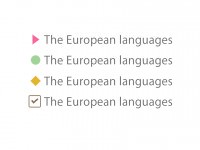

CSSで作ると、サイズやカラー変更もできて便利!
コピペでも使えますので、ぜひ使ってみてください。
目次
はじめに
ベースとなるHTML、CSSはこちらになります。(※CSSリセット済み)
<ul>
  <li>テキストが入ります。<br>改行しました。</li>
  <li>テキストが入ります。</li>
  <li>テキストが入ります。</li>
</ul>

<style>
  ul{
    font-size: 14px;
    line-height: 1.5;
  }

  li + li{
    margin-top: 5px;
  }
</style>
丸
塗りつぶし
- テキストが入ります。
改行しました。 - テキストが入ります。
- テキストが入ります。
<style>
li{
  position: relative;
  padding-left: 15px;
}

li:before {
  content: "";
  position: absolute;
  top: .4em;
  left: 0;
  width: 10px;
  height: 10px;
  background-color: #8b6b4e;
  border-radius: 50%;
}
</style>
枠線のみ
- テキストが入ります。
改行しました。 - テキストが入ります。
- テキストが入ります。
<style>
  li{
    position: relative;
    padding-left: 15px;
  }

  li:before {
    content: "";
    position: absolute;
    top: .4em;
    left: 0;
    width: 10px;
    height: 10px;
    border: 1px solid #8b6b4e;
    border-radius: 50%;
  }
</style>
チェックマーク
マークのみ
- テキストが入ります。
改行しました。 - テキストが入ります。
- テキストが入ります。
<style>
  li{
    position: relative;
    padding-left: 15px;
  }

  li:before {
    content: "";
    position: absolute;
    top: .1em;
    left: 0;
    -webkit-transform: rotate(50deg);
    -ms-transform: rotate(50deg);
    transform: rotate(50deg);
    width: 5px;
    height: 10px;
    border-right: 3px solid #8b6b4e;
    border-bottom: 3px solid #8b6b4e;
  }
</style>
枠あり
- テキストが入ります。
改行しました。 - テキストが入ります。
- テキストが入ります。
<style>
  li{
    position: relative;
    padding-left: 25px;
  }

  li:before {
    content: "";
    position: absolute;
    top: .35em;
    left: 6px;
    -webkit-transform: rotate(50deg);
    -ms-transform: rotate(50deg);
    transform: rotate(50deg);
    width: 3px;
    height: 7px;
    border-right: 2px solid #8b6b4e;
    border-bottom: 2px solid #8b6b4e;
  }

  li:after {
    content: "";
    position: absolute;
    top: .2em;
    left: 0;
    width: 15px;
    height: 15px;
    border: 1px solid #8b6b4e;
    border-radius: 2px;
  }
</style>
矢印
三角
- テキストが入ります。
改行しました。 - テキストが入ります。
- テキストが入ります。
<style>
  li{
    position: relative;
    padding-left: 10px;
  }

  li:before {
    content: "";
    position: absolute;
    top: .35em;
    left: 0;
    width: 0;
    height: 0;
    border-width: 5px;
    border-style: solid;
    border-color: transparent transparent transparent #8b6b4e;
  }
</style>
矢印 その1
- テキストが入ります。
改行しました。 - テキストが入ります。
- テキストが入ります。
<style>
  li{
    position: relative;
    padding-left: 10px;
  }

  li:before {
    content: "";
    position: absolute;
    top: .45em;
    left: 0;
    -webkit-transform: rotate(45deg);
    -ms-transform: rotate(45deg);
    transform: rotate(45deg);
    width: 5px;
    height: 5px;
    border-top: 2px solid #8b6b4e;
    border-right: 2px solid #8b6b4e;
  }
</style>
矢印 その2
- テキストが入ります。
改行しました。 - テキストが入ります。
- テキストが入ります。
<style>
  li{
   position: relative;
   padding-left: 15px;
  }

  li:before {
   content: "";
   position: absolute;
   top: .1em;
   left: -3px;
   width: 15px;
   height: 15px;
   border-top: 1px solid #fff;
   border-right: 1px solid #fff;
   border-radius: 50%;
   background-color: #8b6b4e;
  }

  li:after {
   content: "";
   position: absolute;
   top: .5em;
   left: 1px;
   -webkit-transform: rotate(45deg);
   -ms-transform: rotate(45deg);
   transform: rotate(45deg);
   width: 4px;
   height: 4px;
   border-top: 1px solid #fff;
   border-right: 1px solid #fff;
  }
</style>
矢印 その3
- テキストが入ります。
改行しました。 - テキストが入ります。
- テキストが入ります。
<style>
  li{
    position: relative;
    padding-left: 15px;
  }

  li:before {
    content: "";
    position: absolute;
    top: .4em;
    left: 0;
    -webkit-transform: rotate(45deg);
    -ms-transform: rotate(45deg);
    transform: rotate(45deg);
    width: 7px;
    height: 7px;
    border-top: 2px solid #8b6b4e;
    border-right: 2px solid #8b6b4e;
  }

  li:after {
    content: "";
    position: absolute;
    top: .65em;
    left: 1px;
    width: 8px;
    height: 2px;
    background-color: #8b6b4e;
  }
</style>
四角
ダイヤ
- テキストが入ります。
改行しました。 - テキストが入ります。
- テキストが入ります。
<style>
  li{
    position: relative;
    padding-left: 15px;
  }

  li:before {
    content: "";
    position: absolute;
    top: .4em;
    left: 0;
    width: 7px;
    height: 7px;
    background-color: #8b6b4e;
    -webkit-transform: rotate(45deg);
    -ms-transform: rotate(45deg);
    transform: rotate(45deg);
  }
</style>
連番
数字
- テキストが入ります。
改行しました。 - テキストが入ります。
- テキストが入ります。
<style>
  li{
    display: -webkit-flex;
    display: -ms-flex;
    display: flex;
    padding: 0;
    /* sampleの文字は、自由に変更できます。※ただし、before側も合わせる */
    counter-increment: sample;
  }

  li:before {
    content: "("counter(sample)")";
    margin-right: 5px;
  }
</style>
アルファベット
- テキストが入ります。
改行しました。 - テキストが入ります。
- テキストが入ります。
<style>
  li{
    display: -webkit-flex;
    display: -ms-flex;
    display: flex;
    align-items: baseline;
    /* sampleの文字は、自由に変更できます。※ただし、before側も合わせる */
    counter-increment: sample;
  }

  li:before {
    content: counter(sample,upper-latin);
    width: 20px;
    height: 20px;
    margin-right: 5px;
    background-color: #8b6b4e;
    font-size: 12px;
    color: #fff;
    line-height: 20px;
    text-align: center;
  }
</style>
特殊文字・機種依存文字
※「content: “”」に特殊文字を入れたい場合は、16進数に変換したりと少し工夫しないと表示されないのでお気をつけくださいね。
ハート
- テキストが入ります。
改行しました。 - テキストが入ります。
- テキストが入ります。
<style>
  li{
    display: -webkit-flex;
    display: -ms-flex;
    display: flex;
    align-items: baseline;
  }

  li:before {
    content: "\02665";
    margin-right: 5px;
    color: #8b6b4e;
  }
</style>
まとめ
いかがでしたか?
CSSだけでできると その分スライスする手間も省けて、修正にも強いので、うまく利用してくださいね♪